
Silo adds scripting and AI assistants via MCP
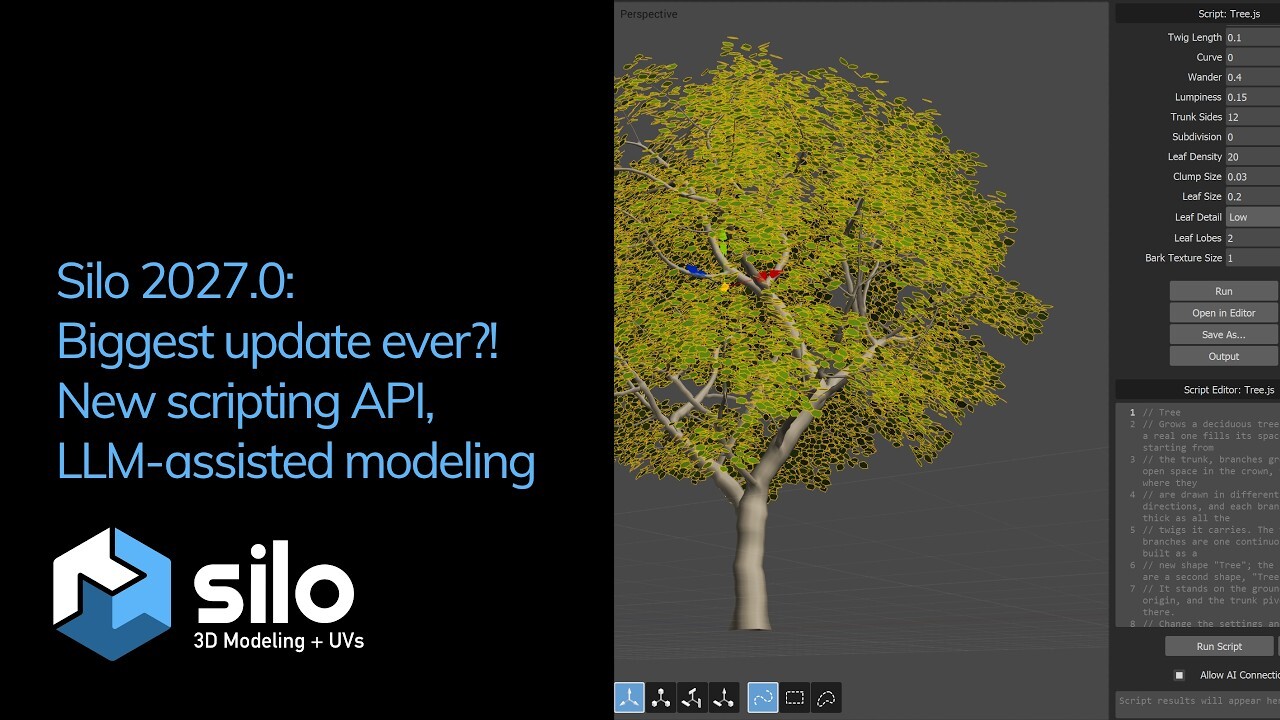
On November 10, Nevercenter released Silo 2027.0. Scripting has arrived in the polygon modeler for the first time. The new JavaScript API includes more than 100 functions and, according to the developers, covers most of what a modeler does by hand. On the same foundation, Silo connects to desktop AI assistants through the MCP protocol. Claude, ChatGPT and other compatible applications see the scene, build and edit geometry, run scripts and take viewport snapshots to check their own work.
The company calls scripting one of the most requested features in the entire history of the product. Routine operations can now be handed off to code or to a language model.
“We are excited to present Silo 2027.0, and this may be the most significant update in Silo’s history,” the Nevercenter announcement says.
Your own tools in JavaScript
The API functions cover a modeler’s basic set:
- creating primitives and arbitrary meshes;
- extrude, bevel, inset and bridge;
- adding edge loops;
- working with selections, materials, UVs and cameras.
Shape generators, selection tools and geometry modifiers can be assembled from these operations. If an artist extrudes and bevels the same panels on a hard-surface model by hand over and over, that sequence can be written once and called with a keyboard shortcut.
Several new elements have appeared in Silo for working with scripts:
- Script Editor — a built-in editor with line numbering, opening and saving files, a resizable output panel and drag-and-drop for .js files. You can also work in an external editor: Silo reloads the changed script on its own.
- The Scripting menu shows the contents of the user’s Scripts folder along with subfolders. Any script can be assigned a hotkey.
- Custom script windows with numeric fields, checkboxes, text fields and drop-down menus. The artist changes parameters, sees the result immediately and saves a successful combination as a new script.
Ready-made examples are available right after installation: Tree, Highrise, Gothic Arcade, Greeble, Spring, Twist and Select Facing. The tree generator and the rough highrise and gothic arcade shapes can come in handy for quick environment blocking. Greeble automatically adds fine technical detailing to a model. These examples can be used to figure out how to write your own tools.
How the AI assistant connects
To turn on the AI connection, you need to check the Allow AI Connection item in the Scripting menu or in the Script Editor. Silo issues a starting prompt that is pasted into the desktop version of Claude, ChatGPT or another application with MCP support. After that the assistant works with the scene, and the changes are visible in Silo in real time.
Among the scenarios the company names building blocking, a rough prop model and monotonous routine tasks. The developers separately highlight help with writing scripts that can then be used again and again. This approach probably reduces dependence on the language model in day-to-day work: the script that has been written stays with the artist and can be edited by hand.
The developers showed the capabilities of the new release in a video.
What the announcement does not say: which Claude or ChatGPT subscription is needed for this, what scene data goes to the external service and how the assistant handles complex tasks. The work runs through external desktop AI applications.
glTF without manual material fixes
The second major part of the release concerns model exchange. In glTF import and export, Nevercenter fixed the colors: sRGB and linear space are now handled correctly. PBR and Phong materials export properly, and hard edges and creases are preserved in both directions. Silo accepts embedded textures and textures that are not in PNG/JPEG, triangle strips and fans, and mirror nodes. Import has become faster, and corrupted files are handled more safely. For those who hand models off to web viewers and game engines, this should mean less fixing after export.
Other formats have seen improvements too. The default material is now preserved on a round trip through USD, FBX and DAE. Empty and disappearing shapes on DXF import have been fixed. Truncated or corrupted .sib files no longer hang the program, and .sib files with modifiers transfer correctly between Windows and Mac. Models in any supported format can now be placed in the Custom Primitives folder.
Faster on heavy meshes
Moving, rotating and scaling on large high-poly models have become noticeably faster, and normals are also recalculated faster. The company does not provide specific measurements.
The modeling tools have been updated as well:
- Bridge connects faces or edge loops of different sizes, as well as two separate objects;
- the edge extrude manipulator works correctly;
- Mirror Geometry has gained options with local axes;
- the rounded bevel produces cleaner geometry;
- edge loop selection and Frame Selection have been improved.
Side-by-side window docking has appeared in the interface. Among the fixes is a crash when beveling several objects at once. On Mac, inertial trackpad scrolling has returned in lists and text fields. The Numerical window now uses right-handed rotation, and viewports can be synchronized when switching cameras.
Price and requirements
The update is free for everyone who bought Silo on nevercenter.com within the past year. Everyone else needs to buy a license upgrade, whose cost is not stated in the published materials. The Silo & Milo bundle is currently on sale for $135 instead of $159. Silo 2027.0 can be downloaded from the product page, where a 7-day trial version is also available. Milo, the related Unreal-based renderer, remains at version 2026.0.
System requirements: 64-bit Windows 10 or newer, or macOS 12 and newer on a Mac with M1 or newer processors. The developers advise checking the trial version on your own computer before buying.
What this changes for Silo users
Silo is known first and foremost as a tool for fast manual modeling. The lack of automation remained its weak spot compared with the large packages, where scripts have long been an ordinary tool. Judging by the contents of the release, Nevercenter is closing that gap. The choice of JavaScript instead of Python, which is more common in 3D, probably lowers the barrier for those who have written at least simple web scripts.
Freelancers and small studios that use Silo as their main modeler for blocking, props and hard surface will probably gain the most: generators and batch operations become available to them without switching to another package. Those who use Silo only for retopology or UVs will need the new capabilities less. The AI part still looks more like an experiment. Its practical value will depend on how clean the geometry the assistant produces on real tasks is; the announcement has no such examples with time estimates. The most durable scenario looks like the combination the developers themselves propose: AI helps write a script, and after that the artist uses it without the model’s involvement.
What would you try first among the new things in Silo 2027.0?
- Your own scripts in JavaScript
- An AI assistant via MCP