
FreePencil2 builds line art from a 3D model in Blender with a single button: 1.28M polygons in under 30 seconds
Japanese anime producer and animator Masamune Sakaki has released an update to FreePencil2 — an add-on that derives a contour drawing from a 3D model in Blender without manual setup. The workflow comes down to three actions: open the model, press one button, get the lines. Stroke density is adjusted with a slider after the calculation, and there is no need to assemble nodes or hunt for outline parameters.
The value for the artist here is in the speed and in the fact that the add-on removes the most labor-intensive stage of the color separation method. According to the developer's measurements, a model with 1.28 million polygons is processed in less than 30 seconds, and a tank with 420,000 polygons in about 19 seconds. In the update's demo video, a scene made of 155 parts is computed in 5.5 seconds.
The speed comes from the simplicity of the principle
The add-on does not perform a heavy calculation of contour lines. The model is automatically painted with vertex colors, and the boundaries between colors are pulled out by edge detection in the compositor — this technique is known as the color separation method. Edge detection is computationally cheap, so processing runs fast.
The difficulty of the method has always been in the preparation — in exactly how to split the model into color zones. Neighboring areas with similar colors produce no boundary, and no line appears; splitting that is too fine produces noise; unnatural dividing lines appear on flat surfaces; part seams and the joints of rigged characters are a separate matter.
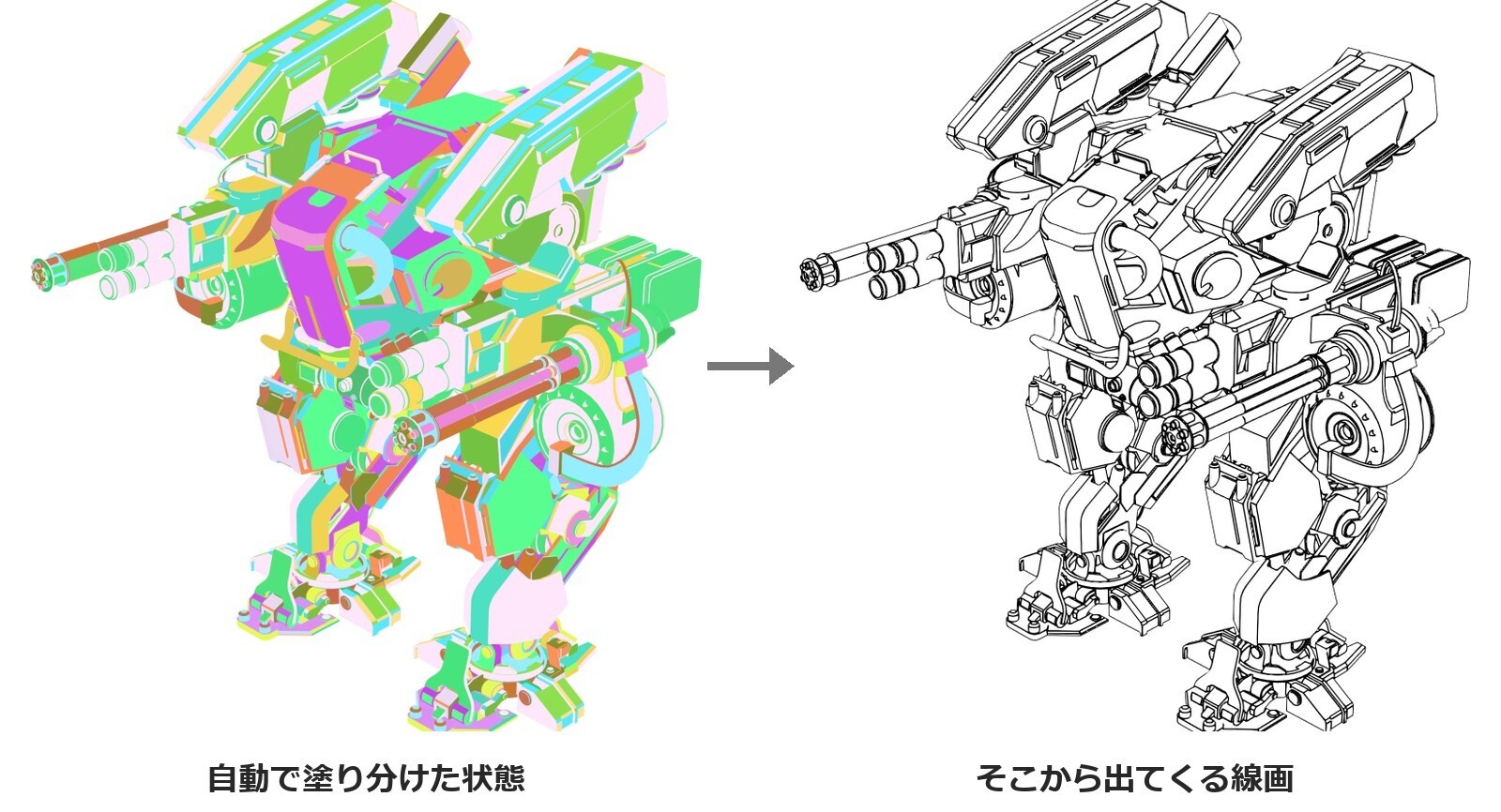
It is exactly this preparation that the add-on takes on:
- it determines the separation angle from the distribution of the model's dihedral angles;
- it colors the adjacency graph so that neighboring areas always fall into different color classes;
- it automatically merges small areas that would otherwise turn into line garbage;
- it separates touching parts by tone;
- it detects the rig and splits the model by bones.
The last point covers the character case: when an armature is present, the coloring is done by bones, faces crossing a joint are not gathered into a single island, and the lines break down less often during bending.
What changed in version 2.7
The main fix is the threshold by which a line is determined: it has been lowered by default. Previously some boundaries did not reach it and no lines appeared on them, even though the color separation worked correctly — the difference in brightness for close combinations such as light blue and white turned out to be too small. The author gives an example: the rigging lines of a sailing ship, which previously broke up into a dotted line, now come out solid.
The change also affects scenes that are already set up. The previous result is restored by setting the “line sensitivity” at STEP3 to a value of 1.0.
The same version fixes crashes on large scenes, speeds up the processing of models with many parts, eliminates the non-working mask color in Blender 5.x and the blackening of files saved in the new version and opened in the old one. Generated nodes are now aligned automatically.
Compatibility, limitations and where to get it
Support is declared for Blender from 4.2 to 5.2, but the branches are not equal. 5.2 LTS and 4.5 LTS are recommended; in 4.2 support is limited — the viewport compositor there does not evaluate AOVs, so there will be no lines in the live preview, although the final render works the same as in the other versions. Blender 4.1 and earlier are not supported.
The known limitations are listed in the repository: transparent materials with the BLEND blend mode are converted to HASHED (the add-on does not handle real glass with refraction); on models with a large number of parts the brightness difference for some of the neighboring areas drops by half and the lines come out pale — the developer counts this problem as unsolved; a file saved in 5.2 breaks the compositor when opened in 4.5. The add-on does not change the shape, the vertex count, sharps or seams.
The source code of FreePencil2 is published on GitHub under the GPL-3.0-or-later license: building the add-on yourself and using it is free. Separately, the author sells for 500 yen a version with a ready-made ZIP, a Japanese manual, access to past versions and support in the comments.
Why such add-ons are growing specifically around Blender
There are two built-in ways to get a contour in Blender — Freestyle and the Line Art modifier for Grease Pencil. Both are computed on the processor and, on complex scenes, work the slower the more geometry and intersections there are, which complicates real-time line preview. For anime production, where the line is the main means of expression, such math runs into the deadline.
Against this background, a separate outline market has formed around Blender: commercial line renderers, third-party builds of the engine with a rewritten NPR renderer, hand-drawn stylization add-ons such as Pencil Pro by CGMatter. FreePencil2 occupies its own niche in this lineup through a different trade-off — it probably loses in accuracy to an honest visibility calculation, but it gives a predictable computation time and delivers the result as an ordinary render pass that then goes into compositing.
If the trend continues, pressure on the built-in tools will grow: the more studios and solo artists build an anime pipeline in Blender, the more noticeable the gap between what the editor can do out of the box and what third-party developers are already doing. The open license works for the community here — the automatic markup ideas implemented in the add-on are in principle available for replication in other tools as well.
What do you need more in FreePencil2?
- Line art in one click
- Automatic vertex color painting